
To check what a payment really costs, keep two separate records: the quote shown before withdrawal and the amount your bank actually credits. A generic percentage cannot replace either. This page supplies a transparent calculation and a reconciliation worksheet for a Pakistan-based freelancer receiving a USD payment.
What the official pricing page establishes
Payoneer's pricing page says charges depend on the transaction type, payment method, currencies and payment corridor. It directs customers to their signed-in fee information and the quote before confirmation. Checked 23 October 2026. The public page is not a personalised Pakistan withdrawal quote, and this guide does not turn its broad ranges into one promised rate.
Record the account-specific fee, exchange rate, withdrawal amount and expected PKR credit. Check separate account or card charges too: a per-transfer calculator does not automatically allocate annual costs. Account eligibility and available withdrawal routes must be confirmed in your own account before accepting work that depends on them.
Choose the correct starting amount
If you start with the original client invoice, include marketplace deductions. If you start with the USD balance already received after marketplace fees, enter zero marketplace fees here. Subtracting them again would understate your net payment.
Likewise, a conversion spread may already be reflected in the quoted exchange rate. Enter a separate processor charge only if it is actually separate. This tool has no live exchange-rate feed and never connects to your bank or Payoneer account.
Calculate net PKR
Loaded values are fictional. Replace them with your own quote. Percentage fields use 10 for 10%, unlike the workbook where you enter 10%.
Blank optional charges mean zero. The deduction order and exclusions are explained below. This calculator does not save or send entries. Use fictional figures on this ad-supported page; use the offline workbook for private information.
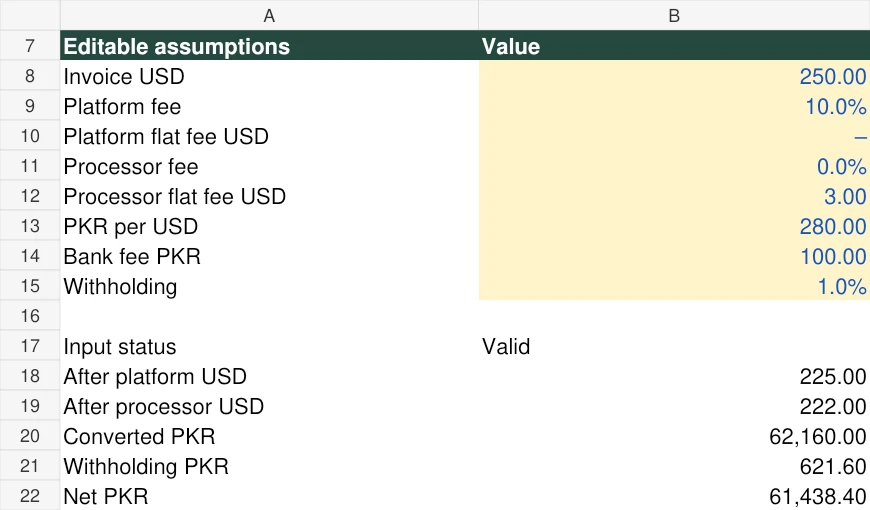
A fully reconciled fictional example
| Step | Calculation | Remaining amount |
|---|---|---|
| Client invoice | Starting assumption | USD 250.00 |
| Platform charge | 10% × 250 = 25 | USD 225.00 |
| Processor charge | Flat USD 3 | USD 222.00 |
| Conversion | 222 × entered rate 280 | PKR 62,160.00 |
| Withholding | Hypothetical 1% × 62,160 | PKR 61,538.40 |
| Bank charge | Flat PKR 100 | PKR 61,438.40 |
Every rate above is invented to demonstrate the method. The withholding input is not a statement of Pakistan's tax rate. The calculator applies the processor percentage to the dollars remaining after the platform charge, then converts, applies withholding to converted PKR, and subtracts the bank charge. If your provider uses a different base, use the actual fee amounts or calculate that route separately.
At the same entered rate, USD 250 without deductions would be PKR 70,000. The difference is PKR 8,561.60, or about 12.23%. This measures deductions relative to your entered rate; it does not measure a spread against an independent market rate.
Match the estimate with the bank receipt
Download the payment reconciliation sheet. Keep one row per transaction and store sensitive receipts privately. Record invoice USD, balance before withdrawal, quoted net PKR, actual credit PKR, settlement date and an explanation for any difference.
Suppose the fictional quote is PKR 61,438.40 but the actual credit is PKR 61,338.40. The difference is PKR 100. That tells you what to investigate; it does not prove which provider charged it. Check whether the receipt lists another bank charge, whether the quote was time-limited, and whether you matched the correct transaction. Ask official support with the transaction reference and amounts, without publishing account identifiers.
Cases this model should reject or distinguish
- Zero fees are valid; a missing required payment or exchange rate is not.
- A percentage above 100 or a negative charge is outside this model.
- A flat fee larger than the money remaining at that stage produces an error.
- An annual account fee is a separate operating cost unless you deliberately allocate a share.
- Refunds, chargebacks, tiered fees, minimum-charge rules and multiple conversions require their own calculation.
The practice workbook uses the same example and shows its calculation steps. Before using either result for a real transaction, compare the assumptions with the actual quote. For your tax obligations or deductions, obtain advice based on your own circumstances.
Inspect the calculator output
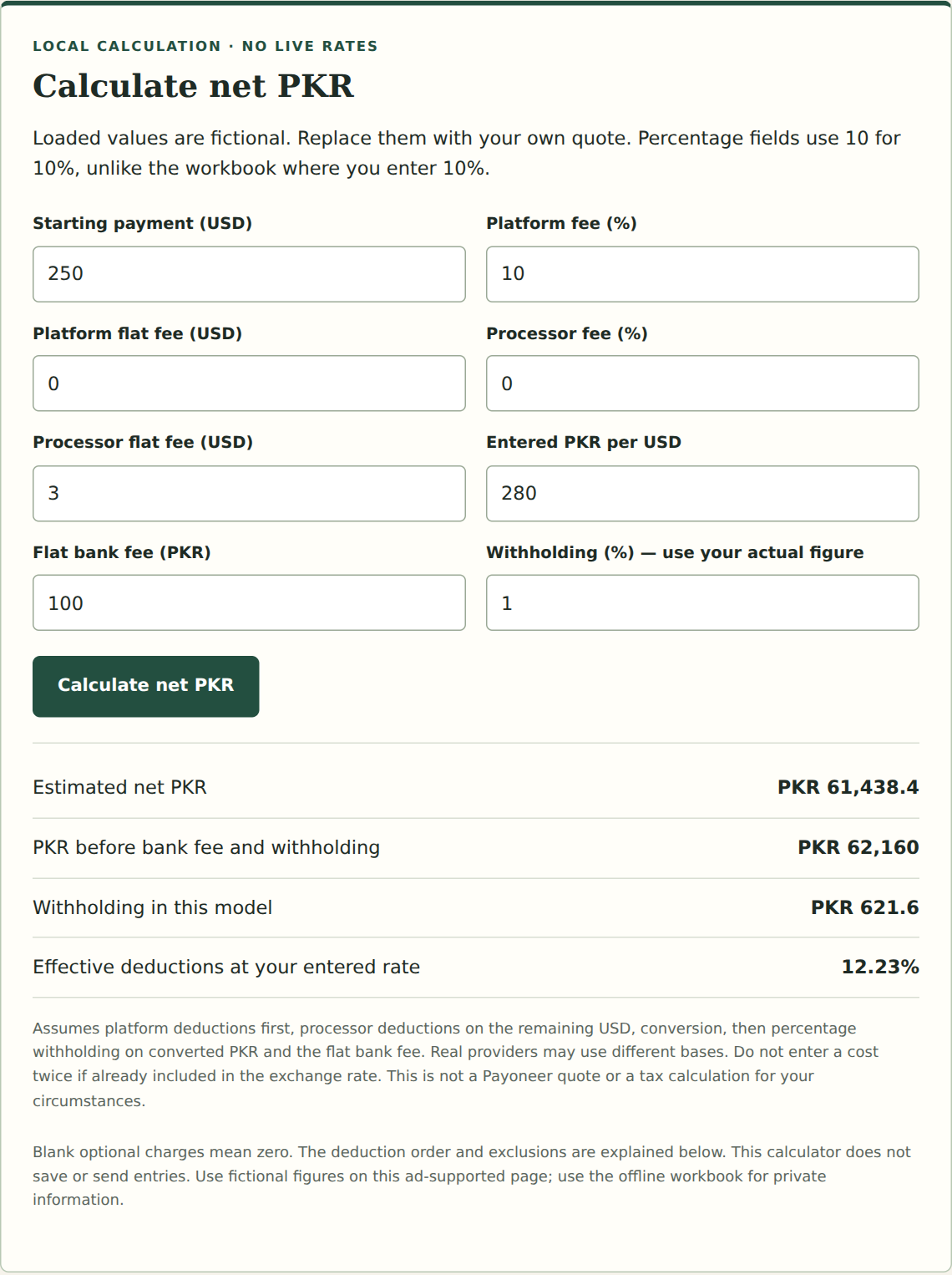
The on-page output and supplied workbook agree for this case. A genuine transaction walkthrough still requires your own quote and credited amount; do not substitute this image for that record.
Official references
Source pages checked on 23 October 2026. These references support platform facts; the practice scenarios and worksheets are our educational examples. Confirm account-specific conditions with the provider.
Practice work and illustrative amounts are labelled in the article. See how we prepare and correct guides and how the resource checks work. Report a specific error or broken step.